
OVERVIEW
Norvado is Northwest Wisconsin's premiere local broadband technology provider. Founded in 1950, Norvado brings cutting-edge technology to Bayfield County, keeping communities connected, vibrant, and competitive with big-city offerings.
CHALLENGES
In addition to providing industry-leading fiber optic high-speed Internet, Norvado sells, installs and maintains hosted PBX, managed network services, telephone and smart home systems, alarm/surveillance systems, IP television services, and other products for residential, commercial, industrial and educational customers. An important part of the business is the pre- and post-installation assessment, which requires a complete and accurate evaluation of existing equipment and facilities.

Without a thorough inventory of the environment, particularly in instances where critical details such as the IP scheme, number of servers and switches - possibly in hidden locations that are not easily uncovered by the Norvado presales team - it becomes highly challenging to properly assess installation needs.
“Often when we go onsite, we are taking over on-premises management from another company. In instances such as this, the client might not be technically minded and as a result, has little understanding of what's on their network or how it works. Sometimes we arrive onsite and find out the IT person responsible for the equipment has either left or now has other responsibilities leaving no one with a clue about the infrastructure. This presents a real challenge for us because in such cases, we have to reverse engineer the environment to see what is there, so we can uncover their implementation needs. That becomes a time consuming and painstaking process,” explained Grant Kolwitz, Senior Customer Network Technician at Norvado.
Adding to the challenge, Norvado recently acquired another regional broadband service provider. This new entity’s experience with installing servers, networks and access points was somewhat limited, which necessitated Norvado’s field team to travel as much as three hours each way to do a network inventory and/or Wi-Fi survey of a potential new client. This made the task of quoting a job more difficult.

The Norvado field team recognized that a better assessment tool, one that could be easily used by less technically skilled personnel, would be crucial in helping to keep up with the workload of their rapidly expanding business.
SOLUTION
Because the pre-sales survey assessment can be as varied as each client’s individual network environments, Norvado needed a comprehensive testing tool that could be deployed to field team members. The NetAlly EtherScope® nXG all-in-one handheld network analyzer was chosen to enable sales, field engineers and technicians to conduct a wide range of assessment tasks, from project planning, equipment inventory, coverage mapping, deployment, maintenance and documentation of clients’ ever-changing Wi-Fi and Ethernet access networks.
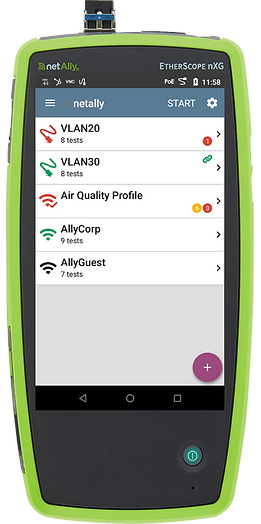
The EtherScope® nXG is used by Norvado’s pre-sales teams to thoroughly assess the client environment and prevent unexpected surprises later in the project. About their use of the analyzer, Grant says, “Our pre-sales team is the first point of contact with the client, so we want them to be equipped with the right tools. Using the EtherScope nXG has allowed pre-sales to gather a great deal of intel without field engineers having to intervene. All they have to do is either plug in or do a scan and collect the data. This tool is a gamechanger.”
Grant went on to explain that because the EtherScope nXG tool was so thorough in collecting and assessing the environment, it meant field engineers didn’t have to follow up with a second site visit. Pre-sales team members were also able to use the AirMapper™ Site Survey App within the EtherScope nXG tool to quickly and easily gather location-based Wi-Fi measurements and create visual heat maps of key performance. This was instrumental for project planning and developing an accurate quote for the installation.
Once the quote is accepted and implementation is completed, field engineers use the EtherScope nXG to conduct a secondary scan to document everything that was done. This documentation is automatically uploaded via the complimentary Link-Live Cloud Service where it can be accessed, reviewed and shared as needed to verify the project was completed as specified.
RESULTS
Putting the EtherScope nXG in the hands of Norvado’s pre-sales team has delivered significant time and cost savings for the business. “The total territory covered by our business can necessitate up to a three-hour drive to be onsite with a client. That’s a lot of time in transit for field engineers such as myself. By giving the handheld EtherScope nXG network analyzer to our pre-sales team, they can conduct pre-assessment surveys and Wi-Fi heat mapping quickly and easily, eliminating the need for a follow-up trip to the site.
The level of accuracy delivered by this tool ultimately saves us critical time and money,” explained Grant, adding that “the ability to create before and after documentation of the Wi-Fi coverage is extremely helpful when sitting down with the client. Now the field team can visually demonstrate the effectiveness of the implementation. Also, documentation, along with pictures, case notes and passwords, are uploaded to the Link-Live Cloud Service, where they are available to clients upon request”.

Grant concludes “The EtherScope nXG and AirMapper Site Survey App has made our pre-sales and field engineering teams far more efficient, minimizing surprises, and getting a fuller, more complete picture of the environment. There are no other tools on the market that do for us what NetAlly’s EtherScope nXG does. It makes our job easier and speeds up our assessments. That means we have more time to meet with clients, which in turn allows us to help grow the business.”
For more information on the NetAlly EtherScope® nXG and AirMapper™ Site Survey visit: www.netally.com/products/etherscopenxg/ or www.netally.com/products/airmapper-site-survey/


